Guides5 min read
WhatsApp Authentication in 2026: Phone Number, Passkeys & Account Security
Learn how WhatsApp authentication works in 2026, including phone number verification, passkeys, email recovery, two-step verification, linked devices, and account security tips.
WhatsApp Authentication in 2026: A Complete Guide
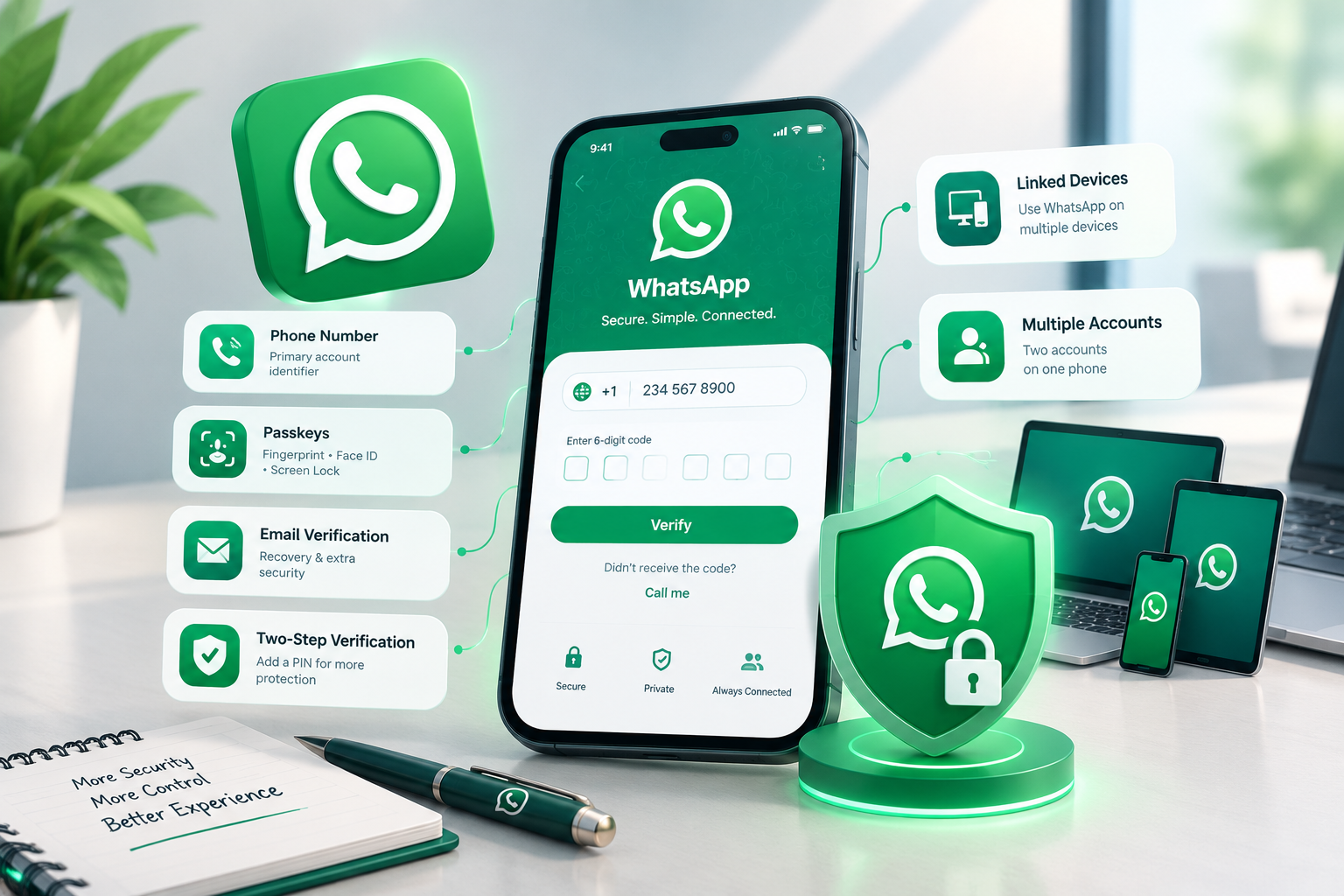
WhatsApp authentication has evolved beyond SMS verification alone. Your phone number remains central to account registration, while passkeys, email verification, additional security settings, and linked devices offer more ways to manage access.
In this guide, VirtuMSG explains how WhatsApp login works, how to protect your account, and what users should know about the latest authentication options.
- How Does WhatsApp Phone Number Verification Work?
To register a WhatsApp account, you need a phone number you can access. WhatsApp generally sends a six-digit registration code by SMS or phone call. Depending on your account and settings, email verification may also be available when signing in to an existing account.
Your phone number remains the primary identifier for your WhatsApp account. If you want to use a different number, you generally need to change the number associated with your account or register another account.
Important: Never share your WhatsApp registration code with another person. Anyone who obtains it may be able to register your account on another device.
- What Are WhatsApp Passkeys?
A passkey allows you to authenticate using your device's security features, such as fingerprint recognition, facial recognition, or your screen-lock method.
Passkeys can make returning to an account easier and reduce reliance on entering verification codes during supported sign-in flows. Availability may depend on your device, app version, and account settings.
A passkey does not mean that your phone number is no longer important. Phone number verification remains part of WhatsApp account registration.
- Can You Use an Email Address to Log In to WhatsApp?
WhatsApp supports adding and verifying an email address as an additional account security option.
Depending on your account setup, a verified email address can help with receiving a registration code when accessing an existing account. However, email does not universally replace phone number verification.
For email-based verification, you must have previously added and verified the email address. You also need access to the phone number associated with your WhatsApp account.
- WhatsApp Two-Step Verification Explained
Two-step verification adds another layer of protection when someone attempts to register your number again.
WhatsApp has been updating its two-step verification system, so the additional credential may be a PIN or a password, depending on your account and the current rollout.
For better security:
- Enable two-step verification in your account settings.
- Keep your recovery email up to date.
- Use a strong, unique password where the option is available.
- Never share registration codes or security credentials.
Remember that the registration code and your two-step verification credential serve different purposes.
- How WhatsApp Linked Devices Work
WhatsApp lets you connect additional devices, including computers, tablets, and compatible companion phones.
Depending on the device and setup, linking can involve scanning a QR code or following another supported linking method. WhatsApp allows up to four linked devices at a time under its standard linked-device setup, although some business subscriptions may offer different limits.
To keep your account secure, review the Linked Devices section regularly and log out any device you do not recognize.
Only scan a linking QR code when you initiated the process and trust the device. Scammers may try to trick people into linking someone else's device to their account.
- Can You Use Two WhatsApp Accounts on One Phone?
WhatsApp supports using two accounts on one phone when the feature is available on your device. Each account needs its own phone number, such as a number connected to a separate SIM or eSIM.
This can help people keep personal and work conversations separate. Notification and privacy options can be managed for each account.
Use the official WhatsApp application and avoid unofficial versions that claim to offer extra account features.
- Does Facebook or Instagram Login Work for WhatsApp?
WhatsApp account authentication remains separate from signing in to Facebook or Instagram. Being connected through Meta's account-management features does not automatically mean you can use Facebook or Instagram credentials to register a WhatsApp account.
Always follow the authentication options displayed in the official WhatsApp app.
- Best Practices for WhatsApp Account Security
Whether you use WhatsApp for personal communication or business, a few habits can help protect your account:
- Keep WhatsApp updated.
- Use a passkey if it is available to you.
- Enable two-step verification.
- Add and verify an email address where supported.
- Keep control of your phone number and SIM.
- Review linked devices regularly.
- Never share one-time registration codes.
- Be cautious of unexpected QR codes and device-linking requests.
No single security feature can guarantee complete protection. Combining available safeguards is a better approach.
Frequently Asked Questions
Can I log in to WhatsApp without a phone number?
A phone number remains central to WhatsApp registration. Some existing-account verification options may be available through a previously verified email address, but email is not a universal replacement for the phone number.
Does WhatsApp support passkeys?
Yes. Passkeys are supported on compatible devices and can use fingerprint recognition, facial recognition, or a device screen lock.
Is a WhatsApp passkey the same as a password?
No. A passkey uses your device's authentication system, while a password or PIN is a separate credential used in supported security flows.
How many devices can I link to WhatsApp?
The standard linked-device setup supports up to four additional devices at a time. Some WhatsApp Business subscriptions may offer higher limits.
Can I use two WhatsApp accounts on one phone?
Yes, where the feature is supported. Each account requires a separate phone number.
How can I protect my WhatsApp account from unauthorized access?
Use available security features, protect your registration code, keep your recovery details updated, and remove unfamiliar linked devices.
Final Thoughts
WhatsApp authentication now combines phone number verification with additional security options such as passkeys, email verification, and two-step verification. Understanding how these features work helps users manage account access and reduce common security risks.
VirtuMSG shares practical guides to help readers understand messaging platforms, account setup, and digital security.